
COO @ Quorivex Systems
We wanted to automate a few workflows but weren't sure where to start. Lampros helped us cut through the noise and get something useful into production quickly.

CTO @ Teralynx Systems
They picked up our processes surprisingly fast and built around how we already worked instead of forcing us into a new system.

Financial Technology Company
We saw value pretty quickly. A lot of repetitive work that used to take hours every week simply stopped being a problem. Our team could focus on higher-value work instead.
Contact Us
Ready to Ship AI Systems to
Let's align architecture, execution, and delivery from day one.
Published On Aug 12, 2026
Updated On Aug 12, 2026

Every growing SaaS company eventually runs into the same problem: operations don't scale as fast as the business.
Support tickets increase, finance teams spend days closing the books, and onboarding a new hire requires work across multiple tools and teams.
These small inefficiencies add up, increasing costs and pulling skilled employees away from higher-value work.
AI workflow automation helps solve this problem, but technology alone isn't enough. Many companies fail to see results because they automate inefficient processes instead of improving them first.
According to Deloitte's State of AI in the Enterprise survey, only 30% of organizations redesign processes around AI, while most simply add AI to existing workflows.
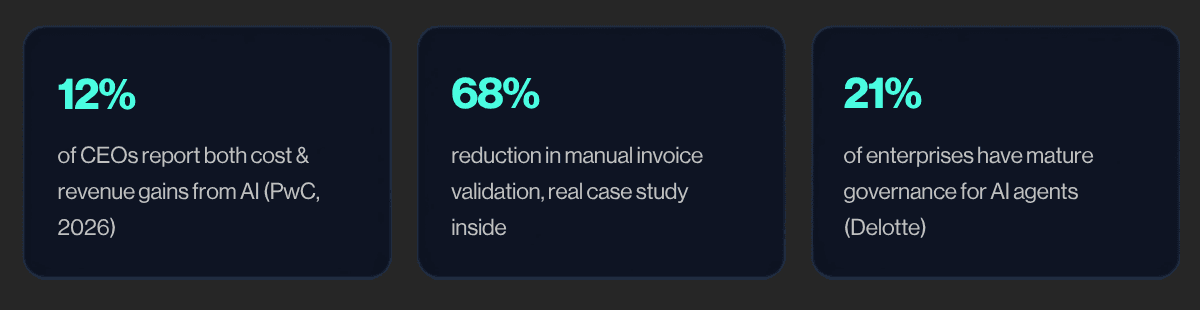
This guide explains what AI workflow automation is, how it works, which tools fit different business needs, and how to identify the processes that deliver the fastest return on investment.
Lets get started.
AI workflow automation means using AI to run repetitive, everyday business tasks with little to no human effort, it reads whatever comes in (an email, a form, a document), figures out what to do with it, and takes the next step for you, inside the systems you already use.
AI-based automation is more like a smart assistant: it can read that same invoice no matter how it's formatted, figure out which approval it needs, and flag the one number that looks off, because it's actually understanding what's on the page, not just matching a template.
Under the hood, three things usually work together to make this possible:
None of this means removing people from the process.
It means your team reviews the handful of cases that actually need judgment, instead of touching every single one by hand.
Microsoft's 2025 Work Trend Index found that close to half of employees, and more than half of leaders, describe their day-to-day work as chaotic and scattered and a lot of that comes down to exactly this kind of behind-the-scenes coordination work.
So what does this actually look like when it's running? The next section breaks down the mechanics.
You don't need an engineering background to follow this, but it does help to see what's happening behind the scenes, especially if you're the one signing off on a vendor or a build.
Here's the path a piece of information takes, from arriving in your inbox to landing in your system of record.
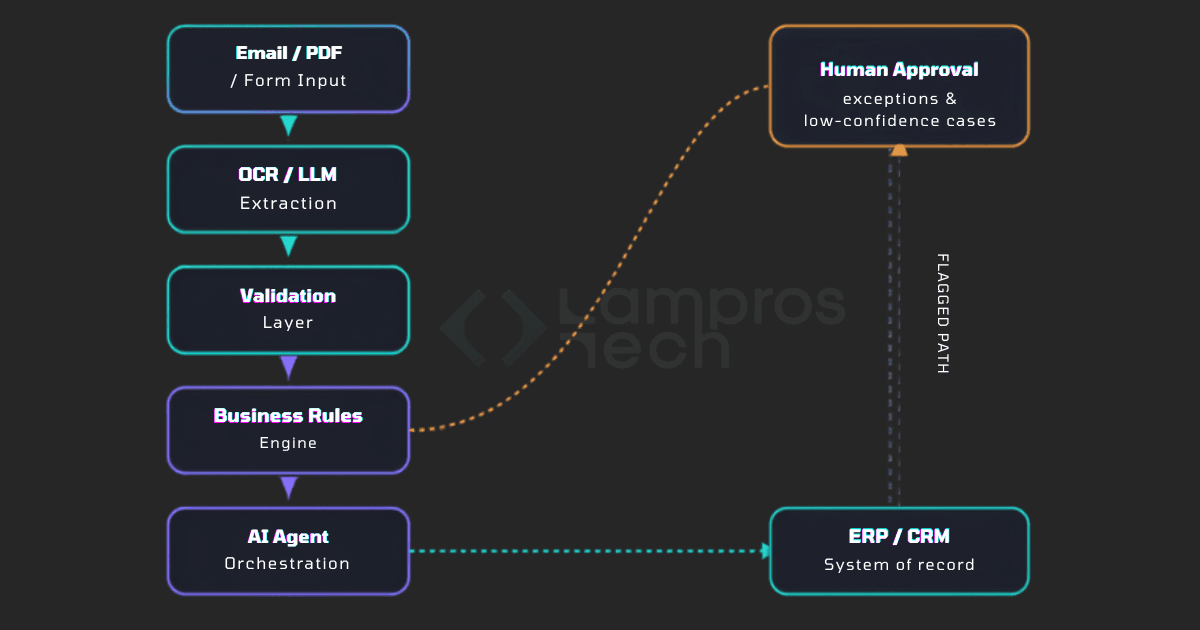
You don't need an engineering background to understand how AI workflow automation works. Every automated workflow follows a series of connected steps that move information from one system to another while keeping people involved when needed.
1. Capture and Extract Data
The process starts when the system receives an input such as an email, PDF, invoice, form, or support ticket. Using OCR and AI models, it extracts the relevant information and converts it into structured data.
2. Validate the Information
Before the workflow moves forward, the system checks whether the extracted data is complete and accurate. It identifies missing fields, formatting issues, duplicate records, or low-confidence results. This validation step prevents errors from flowing through the rest of the process.
3. Apply Business Rules
Once the data is validated, the workflow applies your organization's business rules. This could include approval thresholds, routing logic, compliance requirements, or internal policies that determine what should happen next.
4. Execute the Workflow
The AI agent coordinates the remaining steps. It updates your CRM or ERP, sends notifications, creates tasks, routes approvals, or triggers other connected systems without requiring manual intervention.
5. Review Exceptions
Not every case should be automated completely. When the AI detects missing information, low confidence, or an unusual scenario, it routes the task to a person for review. Human oversight ensures important decisions remain accurate and compliant.
6. Complete and Record
After approval, the workflow completes the transaction and records every action in your business systems. This creates an audit trail and keeps data consistent across applications.
A fair question to ask any vendor: what exactly does your system check before it trusts what it read, and what happens if it's not confident?
That's the machinery. Now let's look at where it actually shows up day to day, because "AI automates finance" doesn't tell you much on its own.
Here's what it looks like function by function:
Once you can see where AI actually fits in your business, the next question is more practical: which tool, platform, or approach should you actually use? That's what we'll walk through next.
The best AI tools for automating business workflows depend on your business size, existing software, and automation goals.
Enterprise organizations often choose UiPath or Microsoft Power Automate, while SaaS companies under roughly 50 employees typically get further, faster, with no-code platforms like Zapier, Make, or n8n.
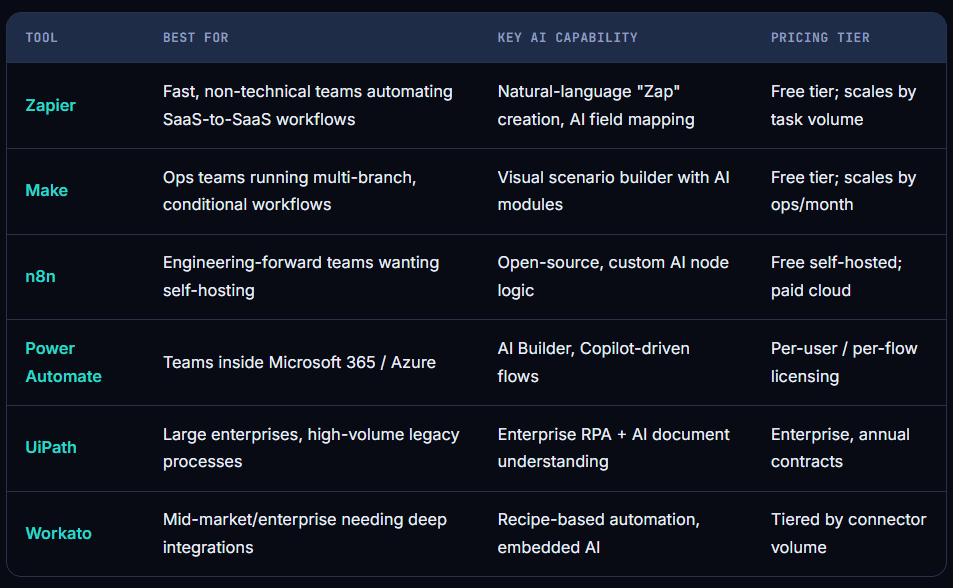
Before you pick a tool, it helps to be honest about where you're starting from.
Not every company is ready for the same level of automation, and that's completely normal, here's a simple way to place yourself on the curve.
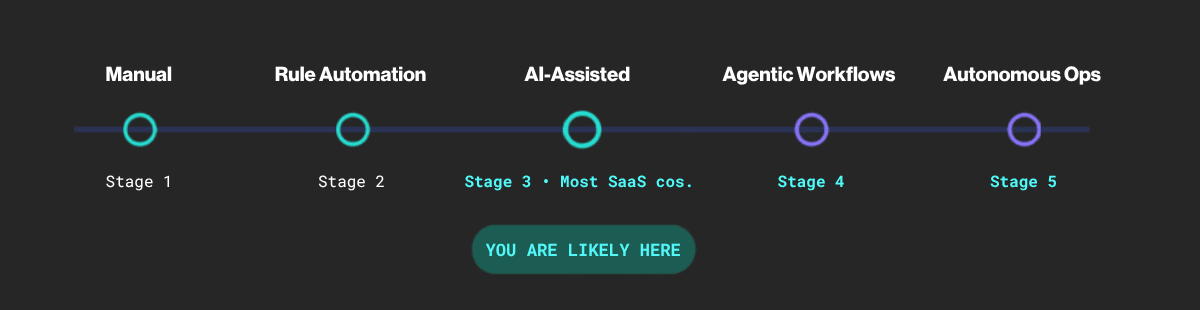
Stage 1 - Manual: Every step done by hand, typical of pre-Series A startups.
Stage 2 - Rule Automation: Basic if-this-then-that automation (classic RPA, simple Zaps).
Stage 3 - AI-Assisted: AI reads and interprets unstructured data, humans review every output; most growing SaaS companies sit here.
Stage 4 - Agentic Workflows: AI handles entire multi-step tasks on its own, start to finish, with a person checking in only when something's flagged.
Stage 5 - Autonomous Operations: Multiple AI systems work together across different workflows, and the whole setup keeps improving itself over time.
Trying to jump straight to Stage 5 without the foundation built at Stage 3-4 first is one of the more common ways automation budget gets wasted, most of the value is earned by getting Stage 3 genuinely right, not by rushing past it.
Wherever you land on that curve, the next practical question is what this is all going to cost.
Good news first: cost scales with how complex the workflow is, not with how big your company is. There's a realistic option at pretty much every budget:
Free tools - Zapier, Make, and n8n all offer free tiers sufficient for a handful of straightforward workflows.
Open-source - self-hosted n8n removes per-task pricing in exchange for managing your own infrastructure.
Subscription/SaaS tools - most no-code platforms scale by task or operation volume, typically low-to-mid hundreds of dollars a month.
Enterprise platforms - UiPath and Power Automate run on annual licensing, justified at high-volume, cross-system scale.
Custom AI automation services - cost varies by scope, pays off fastest for high-volume, compliance-sensitive, or hard-to-integrate workflows.
The right question isn't "what's the cheapest tool" but it's "what's it costing me to keep doing this by hand for another year."
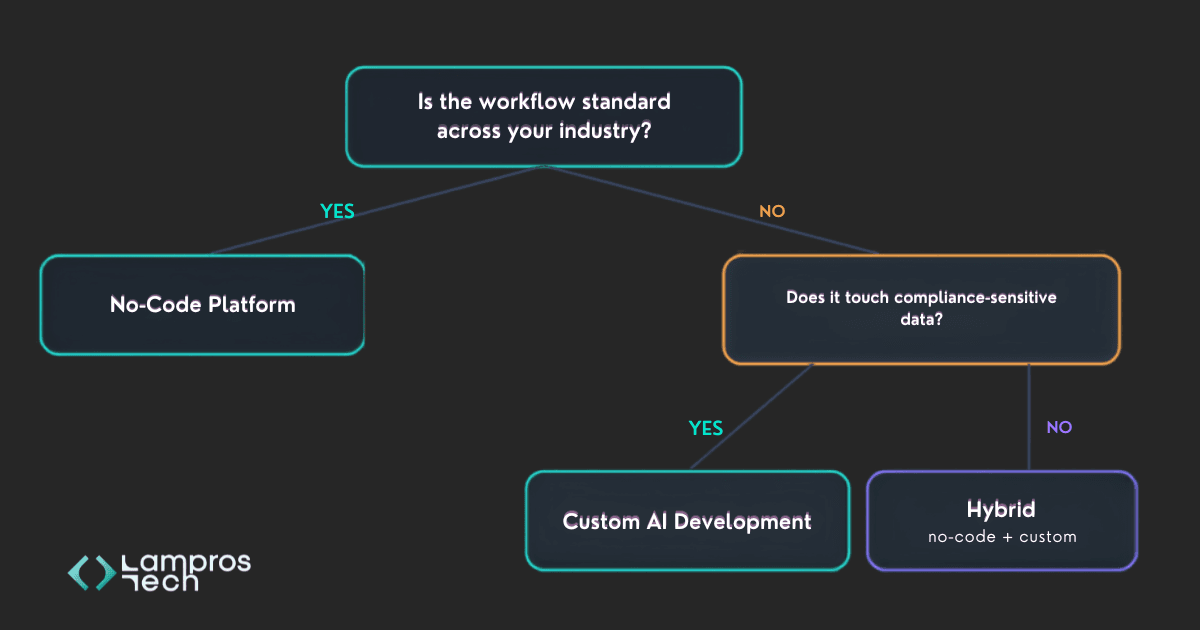
This is the single most important decision in this guide, and the one SaaS founders ask about most. Here's a simple way to tell which side you're on.
Factor | Off-the-Shelf | Custom AI Development |
|---|---|---|
Upfront cost | Low | Moderate to high |
Time to launch | Days to weeks | Weeks to months |
Cost at scale | Rises with usage | Flattens once built |
Compliance control | Limited to vendor certs | Fully controllable |
Legacy system fit | Depends on integrations | Built to fit exactly |
Ongoing maintenance | Vendor-managed | Internal or partner team |
Many SaaS companies land on the hybrid path: no-code tools for the standardized 80% of workflows, and a custom-built or partner-developed system for the 20% that's differentiated, high-volume, or compliance-sensitive.
Picking the right approach is only half the job, though.
The other half is actually rolling it out well and proving that it worked, which is where a lot of otherwise-good automation projects quietly fall apart. That's what we'll cover next.
Here's something worth knowing upfront: most automation projects that stall don't fail because of the technology.
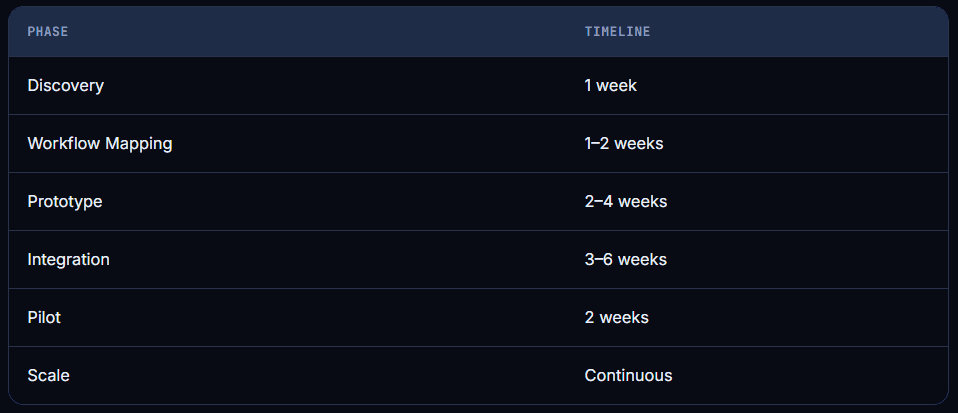
They fail because of the order things happened in. Teams jump to building before they've mapped the process properly, or they skip measuring the "before" so there's nothing to compare against later. A steady rollout looks like this:
Assessment - identify which workflows consume the most manual hours and carry the most error risk.
Workflow mapping - document the current process exactly as it runs today.
Data readiness - confirm inputs are accessible via API and clean enough to interpret reliably.
Tool selection - match the workflow's complexity to the right category.
Integration - connect the AI layer to your actual systems.
Testing - run in parallel with the manual process before switching over.
Human oversight - build in review checkpoints from day one.
Scaling - expand to adjacent processes using the same foundation.
Don't judge success by "does the AI work."
udge it by five things you can actually put a number on: money saved, hours freed up, fewer errors, faster revenue, and happier customers and employees. Here's a simple way to put that into one formula:
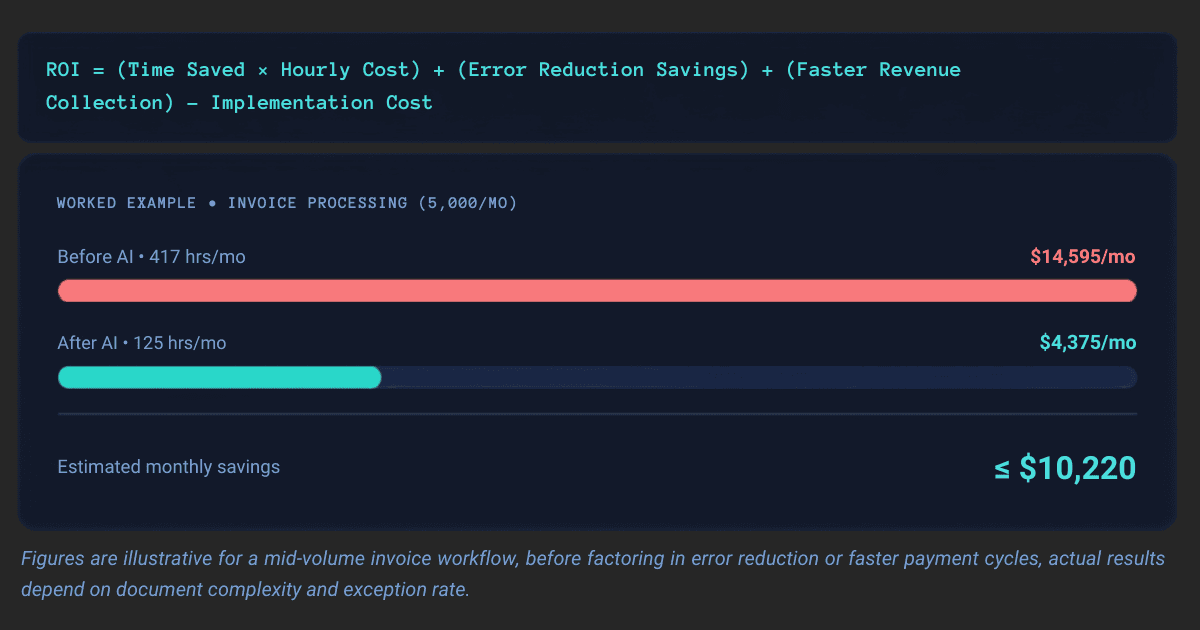
Here's the honest part: most companies don't fail to see a return because the automation doesn't work; they fail because they never decided what "success" would look like before they started. Write down your starting numbers before you build anything, not after.
Once a workflow is live and working, one more thing tends to come up quickly, especially if you're a growing SaaS company being evaluated by enterprise customers or a board.
That's governance: proving the system is trustworthy, not just effective.
Automating a broken process, AI will execute an inefficient workflow faster, not fix it.
Choosing the tool before mapping the workflow, buying a platform because it's popular, then forcing your process into its logic, is backwards.
No governance, without clear ownership and audit logging, you lose the ability to explain a decision after the fact.
No human approval on decisions that matter, full autonomy on anything customer-facing or compliance-sensitive without review is how trust breaks on the first mistake.
Trying to automate everything at once, one high-impact workflow, measured properly, builds the case for the next ten.
Just as important as avoiding these mistakes is knowing where AI shouldn't be making the call at all, no matter how well-governed or well-built the system is.
A mid-sized B2B SaaS company processing roughly 6,000 vendor invoices a month relied on two full-time employees to manually key data from PDFs, cross-check purchase orders, and route approvals over email.
Month-end close routinely took six full days.
After introducing AI-powered document extraction, with human approval reserved for flagged exceptions, manual validation dropped, and close time fell dramatically.
68% - Drop in manual validation
6 to 3 - Days to close the books
A distributed SaaS company hiring roughly 15-20 people a quarter had onboarding scattered across four disconnected tools.
New hires waited three to five days for equipment and system access, and HR spent six to eight hours per hire on coordination alone.
After connecting these systems through an AI-driven onboarding workflow, time-to-productivity dropped by more than half.
>50% - Faster time-to-productivity
<2 hrs - HR admin time per hire
These results aren't unique to finance and HR, similar tools and results exist for nearly every function in a SaaS company.
AI workflow automation is moving beyond automating individual tasks. Businesses are now using AI to manage complete workflows, coordinate actions across multiple systems, and assist employees with day-to-day operations.
The biggest shift isn't more automation, it's better automation. Companies are investing in AI that works alongside existing processes, integrates with core business systems, and keeps people involved in high-impact decisions.
For most SaaS companies, the opportunity isn't to automate everything overnight.
It's to build a solid foundation: clean data, well-defined workflows, and clear governance. Businesses that get these basics right today will be in a much stronger position to adopt more advanced AI capabilities as they mature.

For well-defined, high-volume processes, invoice processing or ticket triage, for example, AI can handle the workflow almost end-to-end, with a human reviewing only flagged exceptions. More judgment-heavy workflows still benefit most from a hybrid model.
Security depends on the platform and implementation. Enterprise-grade platforms offer compliance certifications, encryption, and audit trails; confirm these match your industry's requirements before rolling out.
A single no-code workflow can go live in days. A custom, multi-system integration typically takes 8–15 weeks end-to-end, following a discovery-to-scale timeline like the one outlined above.
Financial services, healthcare, and SaaS operations see some of the fastest returns, largely because they combine high document volume with clear compliance requirements.
No-code platforms like Zapier and Make require no coding for most workflows. More complex or custom integrations typically need engineering support.